
Installation
Einführung
Die Software Blink Voice CRM Integrator können Sie aus dem Internet herunterladen. Es ist ein eigenständiges Installationsprogramm und enthält alle nötigen Dateien für die Installation von Blink Voice CRM Integrator.
Bevor Sie beginnen
Halten Sie bitte Folgendes bereit:
- Ein geeigneter Computer für die Installation der Client-Software (bitte Mindestanforderungen überprüfen)https://nava.gointegrator.com/system-requirements/.
- A valid Access Code and user login credentials for Blink Voice CRM Integrator supplied by your Service Provider
Zugangscode
After completing the software installation process and depending upon the software configuration, Blink Voice CRM Integrator may present the Access Code input window on first launch. Um mit der Benutzeranmeldung fortzufahren, benötigen Sie einen gültigen Zugangscode, der von Ihrem Dienstanbieter bereitgestellt wird. The Access Code is only required on first launch of the Blink Voice CRM Integrator client and may have been entered during installation, in which case this window will not appear and user Login will display.
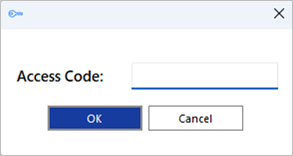
Eine Verknüpfung wird auch in die Programmliste des Windows-Startmenüs eingefügt, um bei Bedarf zu diesem Schritt zurückzukehren.

Massen-Bereitstellung
Blink Voice CRM Integrator kann im Ruhe-Modus mit dem folgenden Befehlsformat auf dem Benutzerdesktop installiert werden: IntegratorInstaller-4.2.0.2050.exe /quiet
After silent installation, the Setup Access Code shortcut is created but Blink Voice CRM Integrator will not automatically start up.
 Report this page