
Installation
Introduction
Le logiciel Blink Voice CRM Integrator est fourni en téléchargement sur internet. Il s'agit d'un programme d'installation autonome qui contient les fichiers nécessaires pour installer une copie de Blink Voice CRM Integrator.
Avant de commencer
Avant de commencer, veuillez vérifier que vous disposez des éléments suivants :
- Un ordinateur compatible avec l’installation du logiciel client (veuillez vérifier la configuration minimale requise)https://nava.gointegrator.com/system-requirements/.
- A valid Access Code and user login credentials for Blink Voice CRM Integrator supplied by your Service Provider
Code d'accès
After completing the software installation process and depending upon the software configuration, Blink Voice CRM Integrator may present the Access Code input window on first launch. Un code d’accès valide, délivré par votre fournisseur de services, est nécessaire pour procéder à la connexion de l’utilisateur. The Access Code is only required on first launch of the Blink Voice CRM Integrator client and may have been entered during installation, in which case this window will not appear and user Login will display.
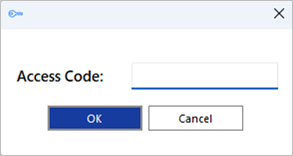
Un raccourci est également placé dans la liste des programmes du menu Démarrer de Windows pour revenir à cette étape, si nécessaire.

Déploiement en masse
L'installation de Blink Voice CRM Integrator en mode silencieux sur le bureau de l’utilisateur est possible à l’aide du format de commande : IntegratorInstaller-4.2.0.2050.exe /quiet
After silent installation, the Setup Access Code shortcut is created but Blink Voice CRM Integrator will not automatically start up.
 Report this page