
Installatie
Introductie
De Blink Voice CRM Integrator software wordt geleverd als een Internet downloadt. Het is een installatie file om de Blink Voice CRM Integrator software te installeren.
Voordat u begint
Voordat u begint, controleer of u het volgende heeft:
- Een geschikte computer voor de installatie van de clientsoftware (controleer de minimale vereisten)https://nava.gointegrator.com/system-requirements/.
- A valid Access Code and user login credentials for Blink Voice CRM Integrator supplied by your Service Provider
Toegangscode
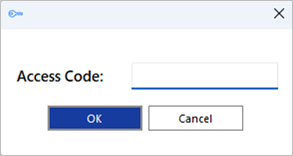
After completing the software installation process and depending upon the software configuration, Blink Voice CRM Integrator may present the Access Code input window on first launch. Een geldige toegangscode, verstrekt door uw serviceprovider, is vereist om door te gaan met gebruikersaanmelding. The Access Code is only required on first launch of the Blink Voice CRM Integrator client and may have been entered during installation, in which case this window will not appear and user Login will display.
Er wordt ook een snelkoppeling in de programmalijst van het Windows Startmenu geplaatst om indien nodig, terug te keren naar deze stap.

Stille uitrol
Blink Voice CRM Integrator kan worden geïnstalleerd op de PC van de gebruiker in stille mode m.b.v. het commando: IntegratorInstaller-4.2.0.2050.exe /quiet
After silent installation, the Setup Access Code shortcut is created but Blink Voice CRM Integrator will not automatically start up.
 Report this page